Introducing agentshield

Assume every attacker is an agent.

Agentshield is open source defense for Kubernetes and AWS. It learns how your workloads really talk, flags lateral movement with evidence, and proposes fixes you approve.

  • Self-hosted
  • Bring your own model
  • Nothing applied without approval
A service graph with one flagged pathThe compromised checkout-api service, which normally talks to orders-api, reaches for the secrets manager. Agentshield flags the path as a possible lateral path before it lands. The rotation controller’s declared path to the same secrets manager is left alone.gatewaycatalogfrontendcartorders-apiledgerfraudinventorycheckout-apirotation-controllersecrets-managerdeclared pathpossible_lateral_path

A person tries a few doors. An agent tries all of them.

Defense in depth already assumes a breach. What changed is who is on the other side. An agent reads the whole environment, tries every route from the workload it holds, and does not get tired.

Reviewing alerts one at a time cannot keep that pace. The reviewer has to be an agent too, and it has to show its evidence.

Signals in. Approved fix out.

Four stages around one graph. Each stage leaves a record, so a finding can always be traced back to what was seen.

  1. Read your systems

    Plugins are Go packages that each know one platform. They watch state, take in telemetry, and publish what they see. Kubernetes, Istio, Cilium, agentgateway, Falco, and AWS are in the box.

    • kubernetes
    • istio
    • cilium
    • agentgateway
    • falco
    • aws

    Logs arrive over OTLP at POST /v1/logs, or from Amazon Data Firehose for AWS

  2. Map them in one graph

    Workloads, identities, policies, and exposures become nodes. Relationships become typed edges. Every assertion keeps the plugin, rule, and evidence that produced it.

    subject
    shop/orders
    predicate
    communicates-with
    object
    payments/ledger
    plugin
    istio
    source
    demo-cluster
    rule
    telemetry.communication-edge-lease

    An assertion from the demo environment

  3. Detect what changes

    Detectors check every graph change against the last coherent state. A rule you activated, or one a model drafted and you approved, turns a match into a finding on its own. A new path or exposure goes to an investigator model, which walks the graph and answers with evidence, or with nothing.

    Every graph change
    Detectors check whether it is new.
    An active rule matches
    A finding, with no model call.
    A new path or exposure
    The investigator takes over.
    No signal
    Nothing reaches a model.
  4. Fix what you approve

    An investigated finding carries the outcomes that would close it. Plugins declare the actions they can take. You choose one, review the prepared change, and approve. Agentshield applies it and re-reads the result.

    1. Plan
    2. Dry run
    3. Approve
    4. Apply
    5. Verify

    Nothing is written before the approval step

The model proposes. The graph decides.

A model can investigate a change or draft a rule, and neither is taken on trust. A finding is checked against what the graph returns. A drafted rule stays in shadow mode until you approve it.

Runs on a new path or exposure

Investigator

An investigator model gets a compact packet and queries the graph through read-only tools. It can pull telemetry for a time slice when it needs the detail. It returns a finding with evidence, or nothing.

  • get_security_neighborhood
  • get_telemetry_chain
  • get_governance_posture
  • find_graph_paths
  • get_incident_timeline
  • get_behavior_baseline
  • Runs from its own sampled, budgeted queue, so a slow model never delays detection
Runs on every answer

Validation

A finding is promoted only if it cites facts and evidence the graph actually returned. A wrong reference gets one correction turn.

  • If a query hit its bound, nothing is promoted from it
  • Model prose never overrides the check

Runs once per Deployment revision

Rule author

After a baseline window, a model reads the requests a Deployment actually made and drafts up to three narrow rules. A draft runs in shadow mode until you approve it. An approved rule matches with no model call.

  1. Baseline window
  2. Shadow draft
  3. You approve
  4. Active rule
How detection rules work

Same request. Different verdict.

Lateral movement looks like normal traffic until you know what is allowed. So every attack in our evals has a benign twin that makes the identical request.

Both workloads sendGET /v1/secret/data/payment-signing-key

From checkout-api, compromised

After a normal day of order traffic, it reaches for the payment signing key. No policy declares that path.

Finding possible_lateral_path

From secret-rotation-controller, benign

It reads the same key on a schedule, through the path it was declared to use. Nothing about the traffic is new.

No finding

Six campaigns: three attacks and their three twins, across a compromised service, a build worker, and an identity provider. A campaign is scored only after the plugin’s own observation reaches the graph. The expected answer never reaches the model.

Read the eval catalog

Findings that show their work.

  • Evidence you can follow

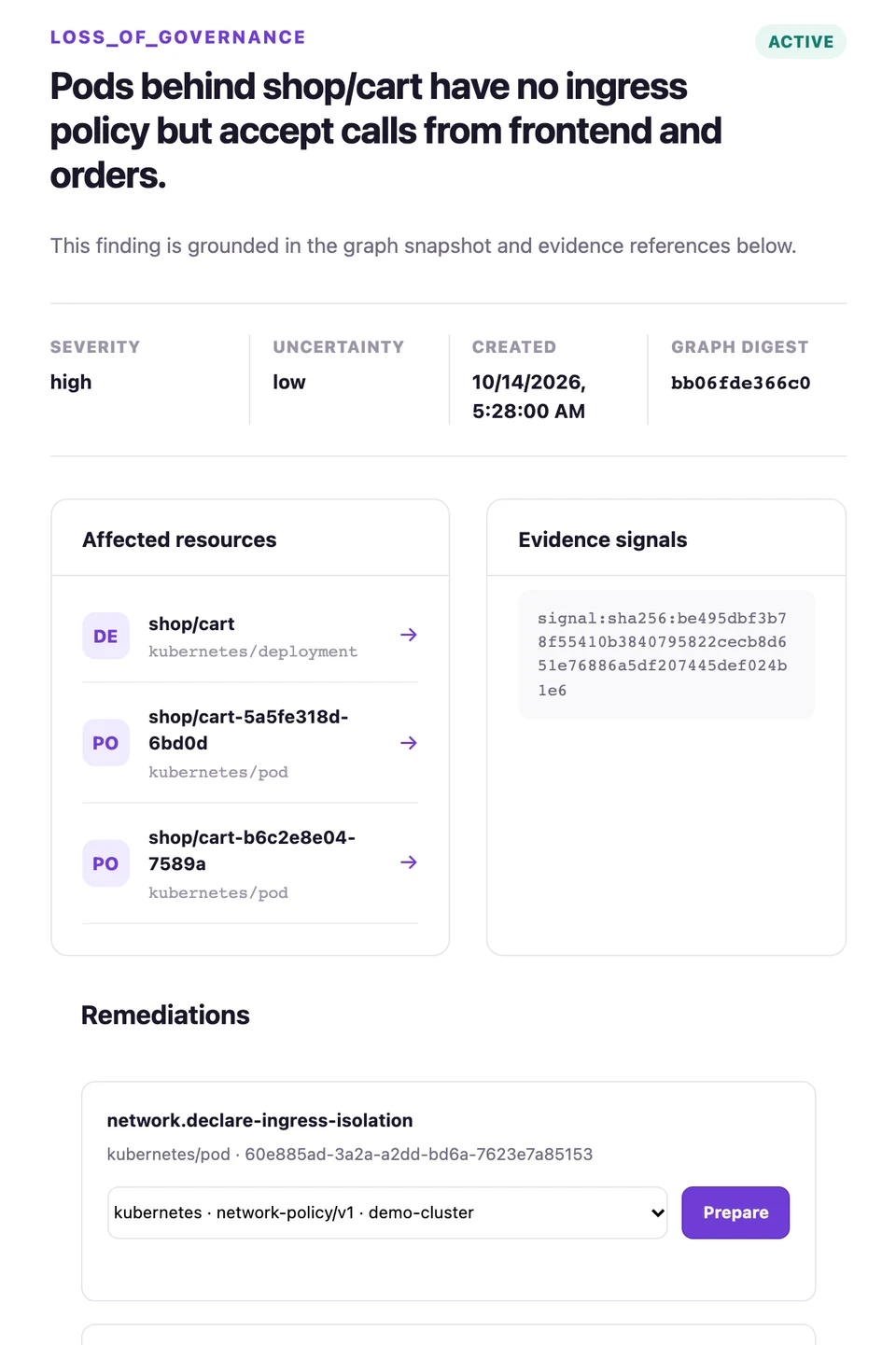
    Every finding lists the resources it affects and the evidence signals behind it, pinned to the graph digest it was raised on.

  • Uncertainty, stated

    Each investigated finding carries a severity and the model’s own uncertainty, so you know what to read first and what to doubt.

  • Fixes from the plugins that can apply them

    Kubernetes, Cilium, and Istio declare the actions they can take. You pick one, review the change it prepared, and approve it. Agentshield applies it and re-reads the policy to verify it landed.

How remediation works
The finding view for shop/cart: severity, model uncertainty, graph digest, affected resources, evidence signals, and a remediation with a Prepare button.
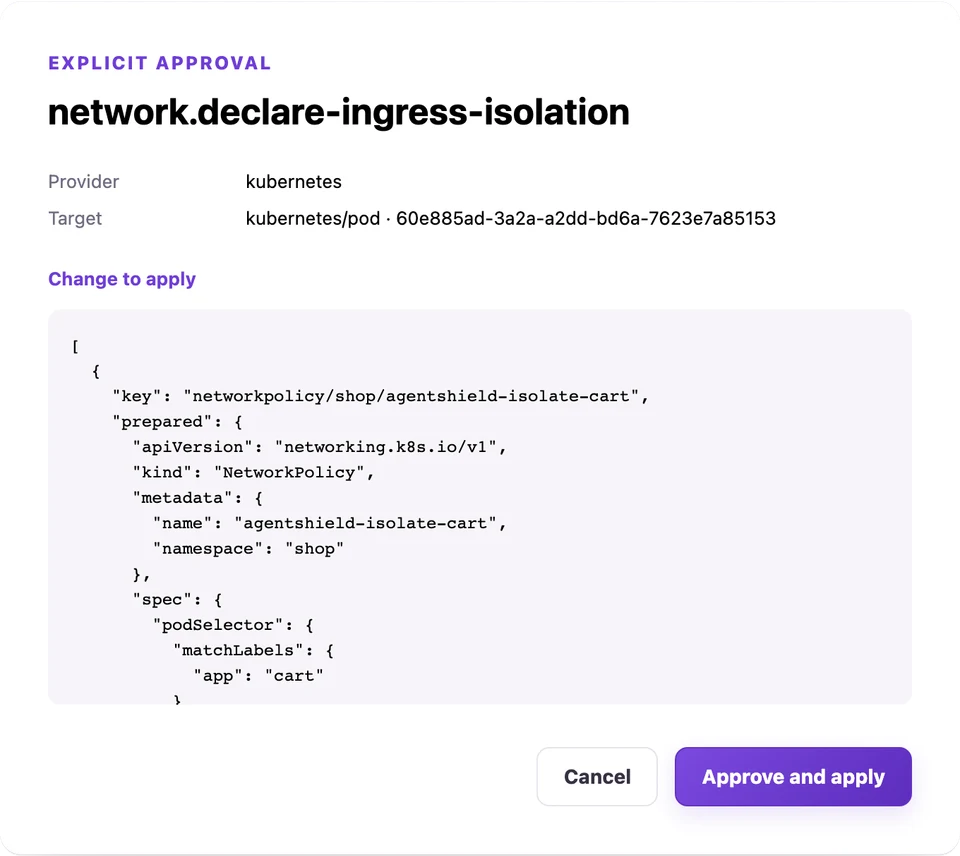
The approval dialog for network.declare-ingress-isolation, showing the provider, the target, and the exact NetworkPolicy change to apply, with Cancel and Approve and apply buttons.
The explorer running against a demo environment: a shop on Kubernetes and Istio.

Plugins are how it sees.

A plugin is a Go package. It reads one system, publishes what it finds into the graph, and can declare the fixes it knows how to apply. If a system can report changes, it can be a plugin.

Planned: Tetragon.

  • Kubernetes

    Workloads, services, RBAC, and admission config. One shared watch per resource type, reused by every plugin built on it.

    • Discovery
    • Remediation
  • Istio

    Mesh policy, ambient enrollment, and exposure. Turns waypoint OTLP access logs into bounded communication rollups.

    • Discovery
    • Telemetry
    • Remediation
  • Cilium

    CNI policy and endpoints. A Hubble flow normalizer exists, but no transport feeds it yet.

    • Discovery
    • Remediation
  • agentgateway

    Early

    Gateway API semantics for GatewayClass, Gateway, and HTTPRoute. Its access-log normalizer has no transport yet.

    • Discovery
  • Falco

    Early

    Interactive-shell alerts from Falco, forwarded by your collector. A Pod that opens a shell gains an executes edge in the graph.

    • Telemetry
  • AWS

    Early

    EC2 instances, network interfaces, and security groups in one region. Takes VPC Flow Logs straight from Amazon Data Firehose.

    • Discovery
    • Telemetry

Straight answers.

The rest is in the docs, or one issue away.

Is it only for Kubernetes?
No. Plugins read Kubernetes, Istio, Cilium, agentgateway, and AWS EC2 networking today, and take in Falco runtime alerts. The graph and the plugin contract are provider-neutral, so other environments arrive as plugins. Fixes you can approve are applied through Kubernetes for now. The AWS plugin only observes.
Do I need a model?
Only for findings. Discovery, the graph, telemetry, and the explorer run without one. Two features call a model, and both are off by default: agentic investigation, which needs an OpenAI Responses-compatible endpoint, and Deployment rule authoring, which also works with Anthropic. Setting AGENTSHIELD_MODEL_ENDPOINT alone enables neither.
What does the model see?
An investigation starts from a compact packet with no telemetry in it: resource IDs, kinds, typed security semantics, and opaque evidence handles. Anything deeper comes through six read-only tools pinned to that graph snapshot, and every result is bounded. Rule authoring sees a Deployment’s name, namespace, service account, and a summary of its outbound requests, with query strings removed and identifier-like path segments masked.
Does the model write detection rules?
It drafts them. For each Deployment, a model proposes up to three narrow rules from the requests the Deployment made during a baseline window. A draft runs in shadow mode, recorded but never a finding, until you approve it. You can also write rules in CEL yourself. A match of an active rule becomes a finding with no model call.
Will it change my cluster on its own?
No. Detection, rules, investigation, and planning never apply anything. A change needs your explicit approval of a prepared plan, and the approval endpoints only run on a loopback listener.
How mature is it?
It is early and pre-1.0, so expect breaking changes to APIs, the database schema, and flags. The HTTP API and UI have no authentication, approval state lives in process memory, it runs as one process per database, and verification confirms that the declared policy is present, not that traffic is blocked. Evaluate it; do not expose it.

Run it yourself.

One binary with the explorer built in. It needs PostgreSQL and something to read: a Kubernetes context, AWS credentials, or both. The model is optional.

Needs Go, Node.js with pnpm, Docker, and kubectl.

No cluster? The demo runs the real UI against fake data in your browser. Try the demo

export POSTGRES_PASSWORD='development-only-password'make postgres-upexport AGENTSHIELD_DATABASE_URL="postgres://agentshield:${POSTGRES_PASSWORD}@127.0.0.1:5432/agentshield?sslmode=disable"make run

Open http://127.0.0.1:8088. For findings, point it at a model and turn on agentic investigation, then run make run again.

export AGENTSHIELD_MODEL_ENDPOINT='https://api.openai.com'export OPENAI_API_KEY='<your key>'export AGENTSHIELD_AGENTIC_INVESTIGATION=true