
Once an attacker is inside a system, they may be only one or two hops away from a critical component. That hop, once inside, is called lateral movement. It happens in just about every attack, and because of that, your systems need protection against it.
To do that, you need a watcher that finds the evidence that an attacker could move laterally before they do, not after.
In this blog post, you’ll learn how to get that level of protection with agentshield.
Prerequisites
To follow along with this blog post hands-on, you will need:
- A Kubernetes cluster.
- An OpenAI API key (for agentic detection and investigation).
- PostgreSQL running in your cluster.
- Istio and agentgateway if you want all of the benefits of agentshield. Without them, the basics of agentshield still work.
- A checkout of the agentshield source. You can find it on GitHub.
- A CNI that enforces NetworkPolicy.
What is agentshield?
TL;DR: it watches the components running in your system and checks whether an attacker could move laterally between them.
agentshield watches Kubernetes clusters that run Istio ambient mesh, Cilium, agentgateway and, optionally, AWS, and finds evidence that an attacker can traverse the cluster. It merges workloads, identities, RBAC, network and mesh policies, and observed traffic from Istio waypoint logs and VPC Flow Logs into one graph stored in PostgreSQL.
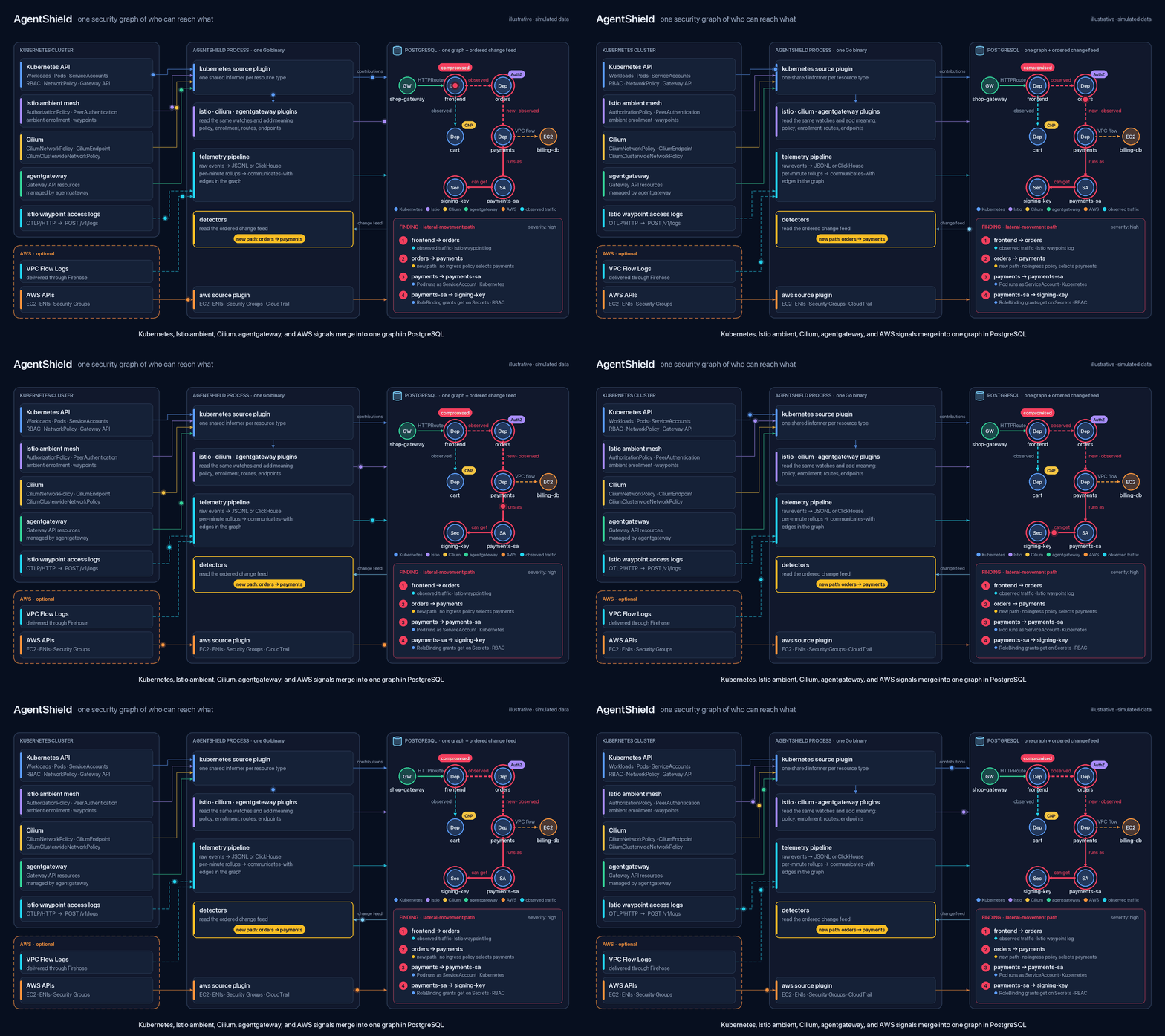
Every fact records which plugin and which observation produced it. When the graph changes, built-in detectors and optional CEL rules look for risky shifts like:
- New exposure
- Lost governance
- New RBAC bindings
- A workload reaching a destination it never reached before
If you turn it on, an LLM investigates those signals through read-only graph tools, and a finding is accepted only when it cites evidence the graph actually returned.
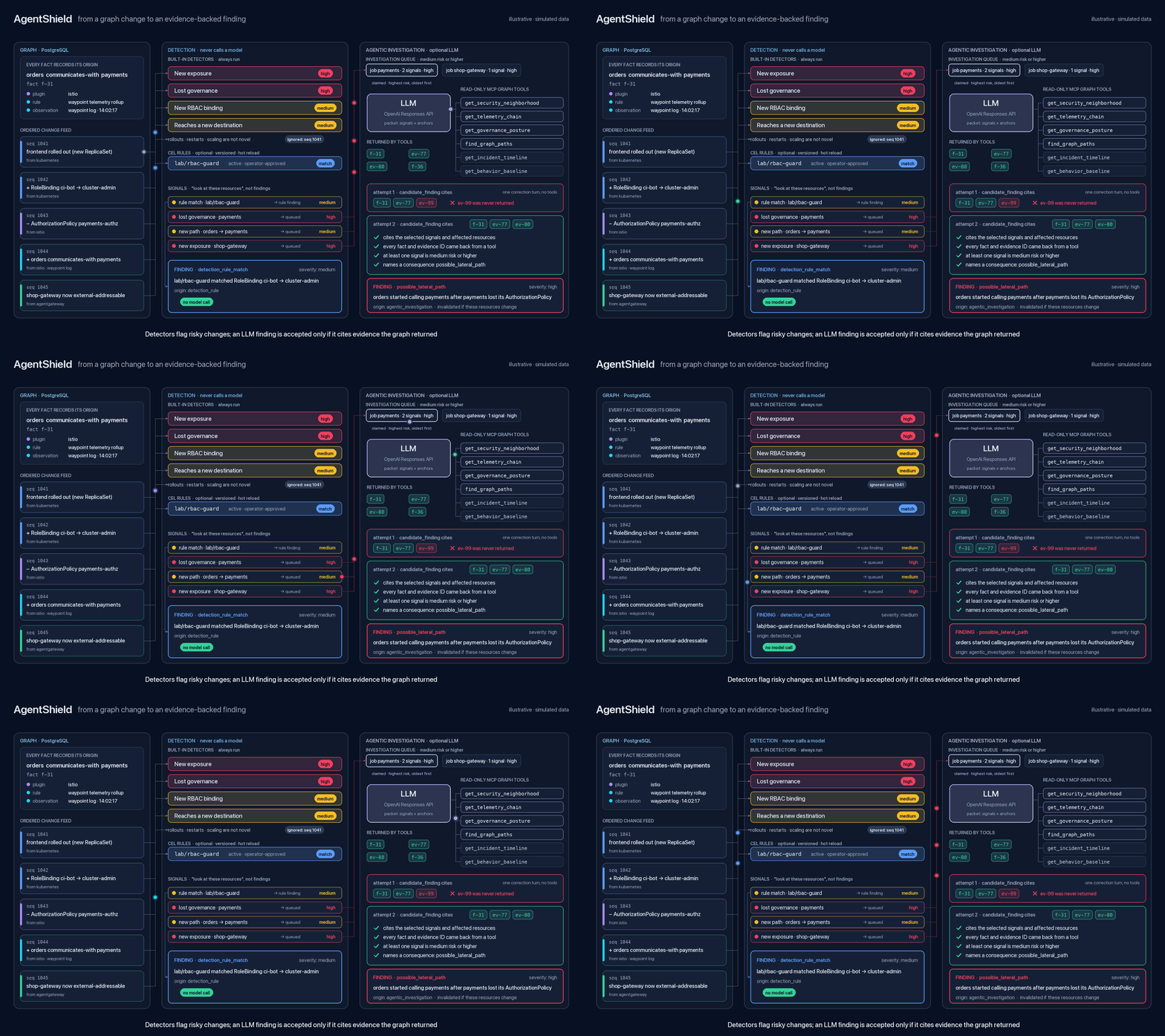
A model can also draft a detection rule for each Deployment, which stays in shadow mode until someone approves it. Findings can propose a fix, like a NetworkPolicy, a CiliumNetworkPolicy or an Istio STRICT PeerAuthentication, but nothing changes until a human prepares and approves it.
In short, it asks of every change in the system: “Did this just open a path that wasn’t there before, and what’s the proof?”
Is it for AI?
agentshield isn’t an “AI security” tool in the general sense. AI is part of the analysis: an LLM investigates detection signals and can draft rules. The closest it gets to AI infrastructure is the agentgateway plugin, which reads Gateway API resources (GatewayClass, Gateway, HTTPRoute) as graph edges.
How AI is used in agentshield
AI is used in agentshield in two ways.
The first is AGENTSHIELD_AGENTIC_INVESTIGATION, the LLM investigation. When a built-in detector flags something new (described in the previous section), such as a new communication path, new exposure or lost governance, the LLM looks into it using read-only graph tools. It can promote the signal to a finding only if it cites evidence the graph actually returned.
The second is AGENTSHIELD_DEPLOYMENT_RULE_AUTHORING, which isn’t an investigation. The LLM watches each Deployment’s behavior for the baseline window (6 hours by default) and then writes a detection rule for it. That rule runs in shadow mode until someone approves it.
You can turn on either one on its own. For investigation only, drop the AGENTSHIELD_DEPLOYMENT_RULE_AUTHORING=true line from the kubectl set env command in Enabling LLM calling.
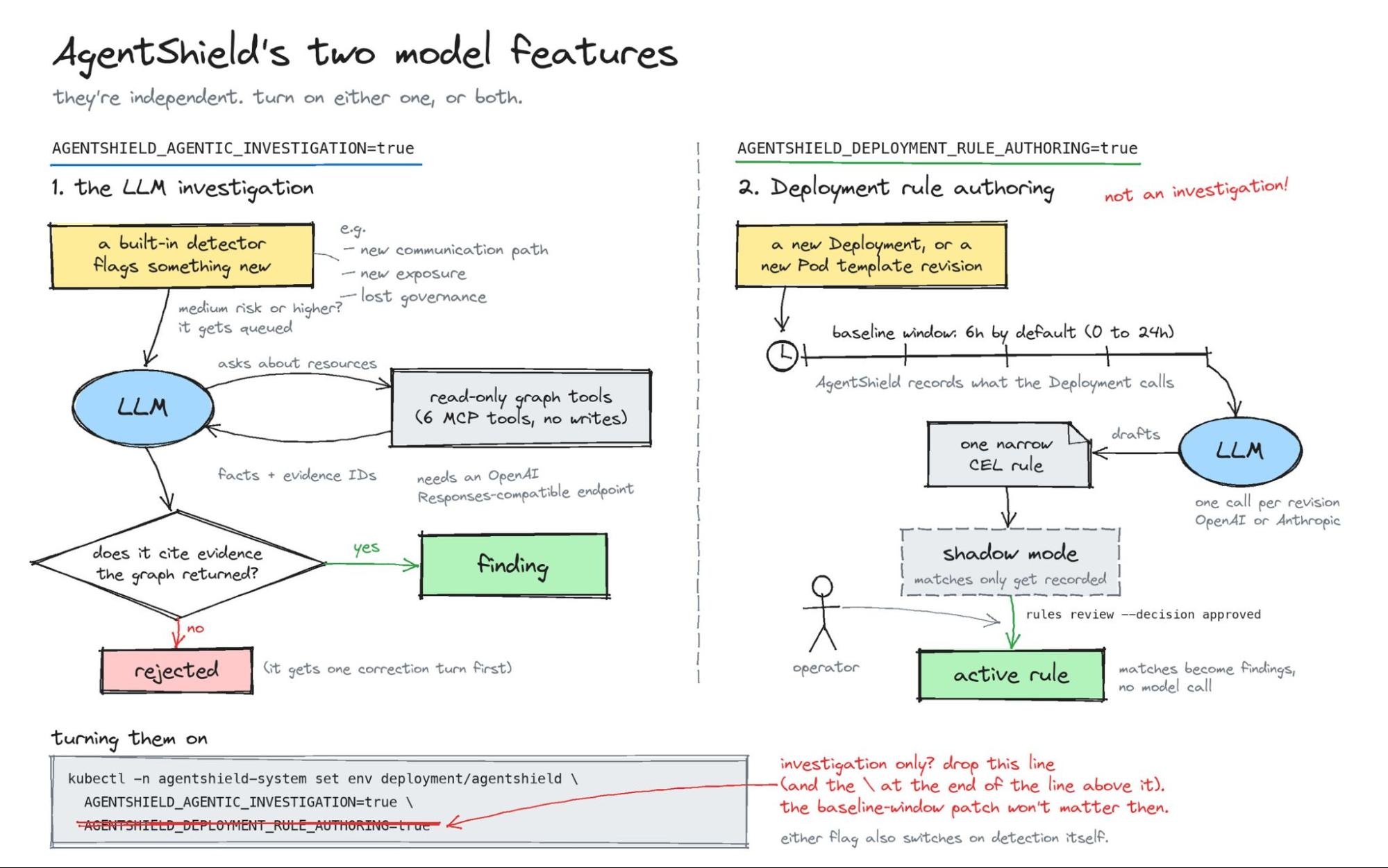
Turning on either feature also turns on detection itself. Detection runs only when at least one of them is enabled. If you skip that section, you get no findings at all, not even from rules that don’t need a model. You still get the graph and the UI.
Installation and configuration
Now that you know the design, the why and the architecture, let’s get to the how. In the sections that follow, you’ll install, configure and use agentshield.
Pick a cluster ID. It is the authority for every Kubernetes identity in the graph, so pick a value and keep it. The
kube-systemnamespace UID is already stable on the cluster.export CLUSTER_ID="$(kubectl get namespace kube-system -o jsonpath='{.metadata.uid}')" echo "$CLUSTER_ID"Install agentshield.
cat > agentshield-values.yaml <<EOF
fullnameOverride: agentshield
image:
  repository: ${IMAGE_REPOSITORY}
  tag: "${AGENTSHIELD_TAG}"
  pullPolicy: IfNotPresent
database:
  existingSecret: postgres
  secretKey: database-url
discovery:
  kubernetes:
    clusterID: ${CLUSTER_ID}
    networkID: ${CLUSTER_ID}
    sourceID: kubernetes/${CLUSTER_ID}
  istio:
    clusterID: ${CLUSTER_ID}
    networkID: ${CLUSTER_ID}
    sourceID: kubernetes/${CLUSTER_ID}
    rootNamespace: istio-system
  agentgateway:
    clusterID: ${CLUSTER_ID}
    sourceID: kubernetes/${CLUSTER_ID}
  cilium:
    clusterID: ${CLUSTER_ID}
    sourceID: kubernetes/${CLUSTER_ID}
EOF

helm template agentshield "$AGENTSHIELD_SRC/deploy/kubernetes" \
  --namespace agentshield-system --values agentshield-values.yaml \
  | grep -E -- '--(kubernetes|istio|agentgateway|cilium)-(cluster|network|source)-id'
helm upgrade --install agentshield "$AGENTSHIELD_SRC/deploy/kubernetes" \
  --namespace agentshield-system \
  --values agentshield-values.yaml
kubectl -n agentshield-system rollout status deployment/agentshield --timeout=300s
You don’t need Istio, Cilium or agentgateway. They are just plugins that can be enabled, and investigation and detection still work without them. Having Istio and agentgateway installed is a big boost for anything based on observed traffic, new communication paths and stronger rule authoring. If you want all of the benefits of agentshield, use both.
Open the agentshield UI.
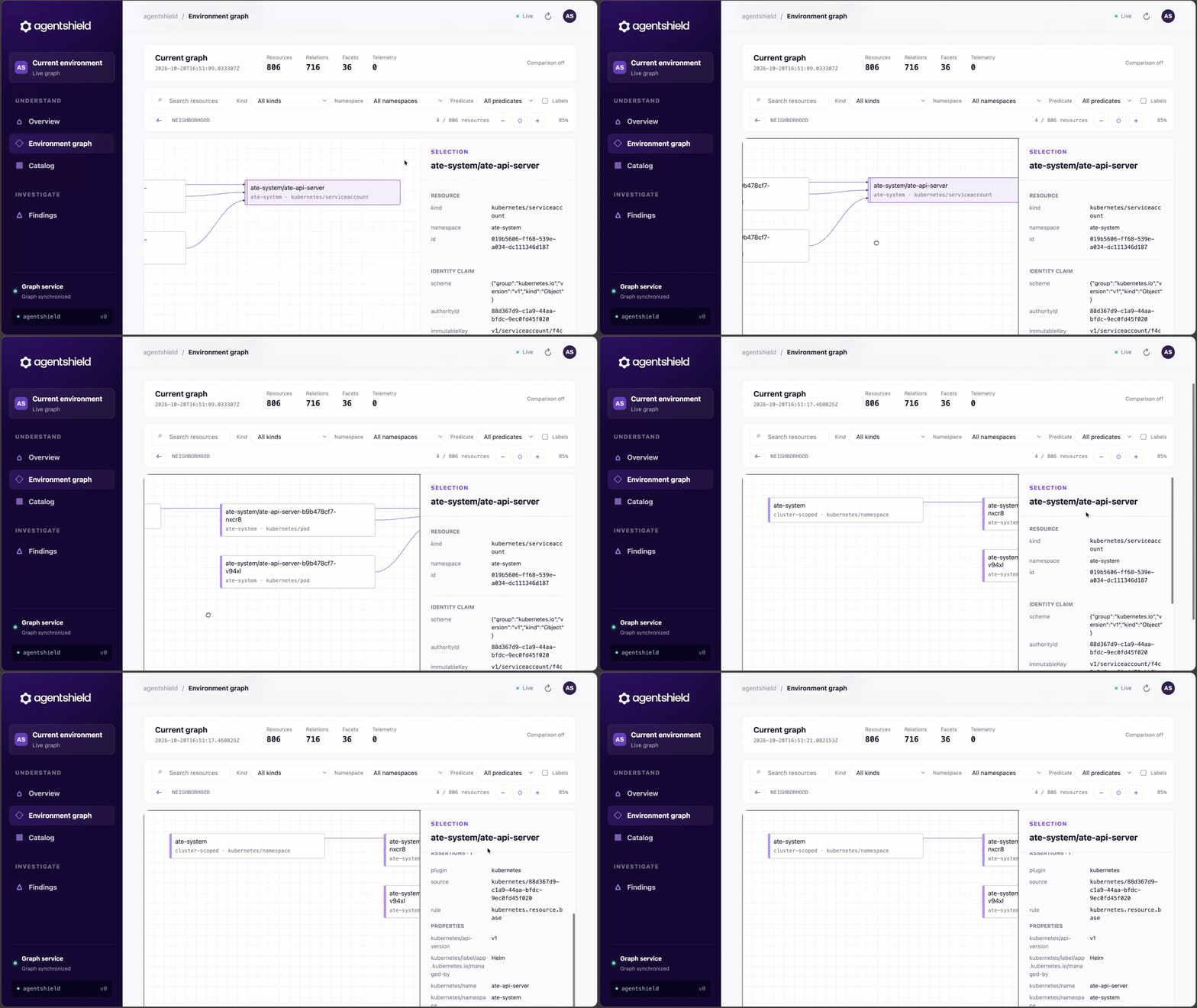
kubectl -n agentshield-system port-forward deployment/agentshield 8088:8088Go to http://localhost:8088. You’ll see the agentshield UI, similar to the screenshot below.
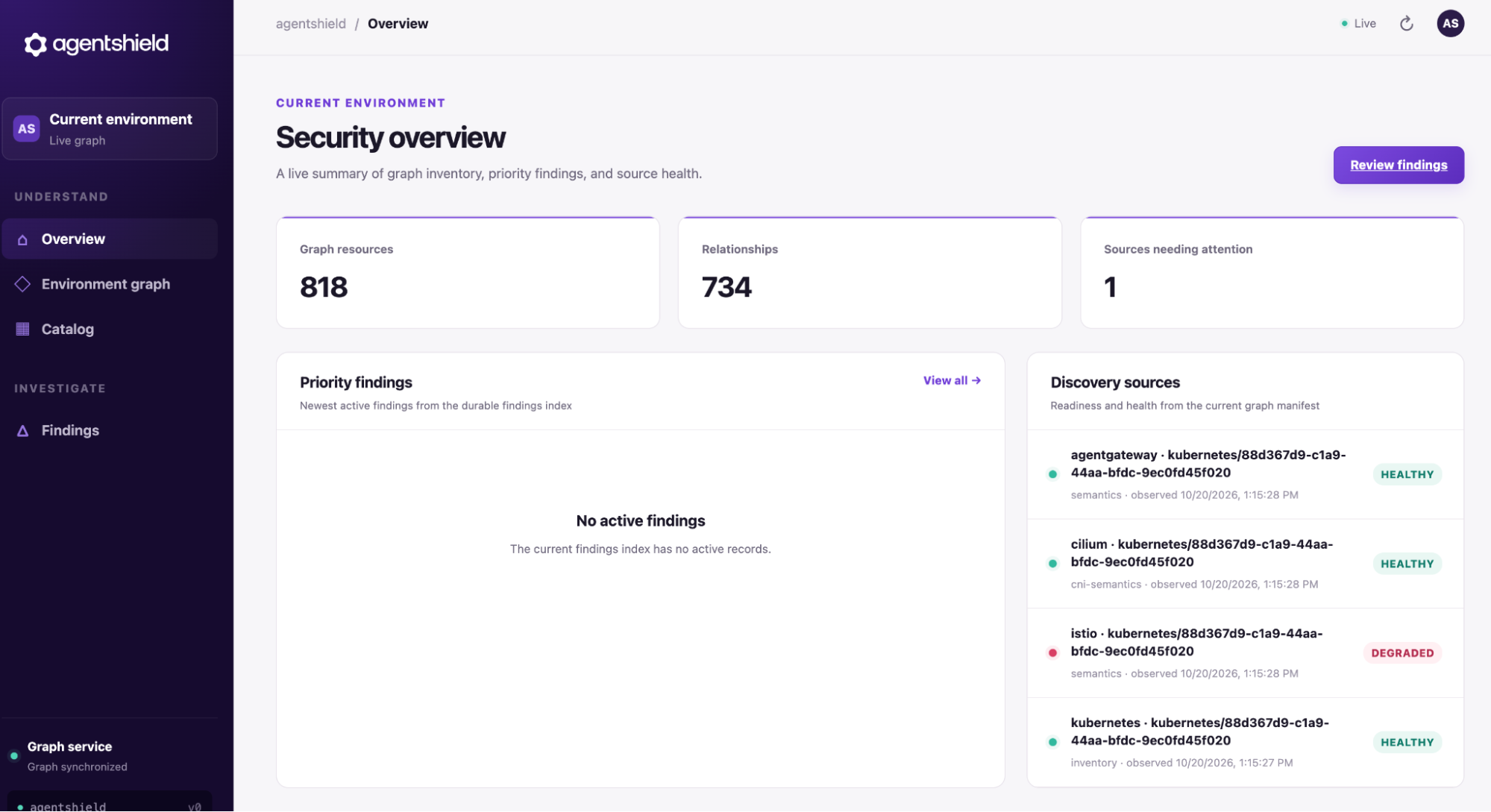
You can begin to see resources and how they connect to each other in the graph.
Enabling LLM calling
As you learned in How AI is used in agentshield, LLM calling for investigation and rule authoring is off by default. You have to enable it in your agentshield configuration. Without it, investigations don’t run. Enabling either flag below (or both) also turns on detection.
To turn on LLM calling, follow the steps below.
Create a secret for your API key, point agentshield at the model endpoint, and turn on
AGENTSHIELD_AGENTIC_INVESTIGATIONandAGENTSHIELD_DEPLOYMENT_RULE_AUTHORING.kubectl -n agentshield-system create secret generic model \ --from-literal=api-key="$OPENAI_API_KEY" helm upgrade agentshield "$AGENTSHIELD_SRC/deploy/kubernetes" \ --namespace agentshield-system \ --values agentshield-values.yaml \ --set model.endpoint=https://api.openai.com \ --set model.existingSecret=model kubectl -n agentshield-system set env deployment/agentshield \ AGENTSHIELD_AGENTIC_INVESTIGATION=true \ AGENTSHIELD_DEPLOYMENT_RULE_AUTHORING=trueMake sure the deployment succeeded and detection is on.
kubectl -n agentshield-system rollout status deployment/agentshield --timeout=300s
kubectl -n agentshield-system logs deployment/agentshield --tail=50 | grep 'detection enabled'
Running an investigation
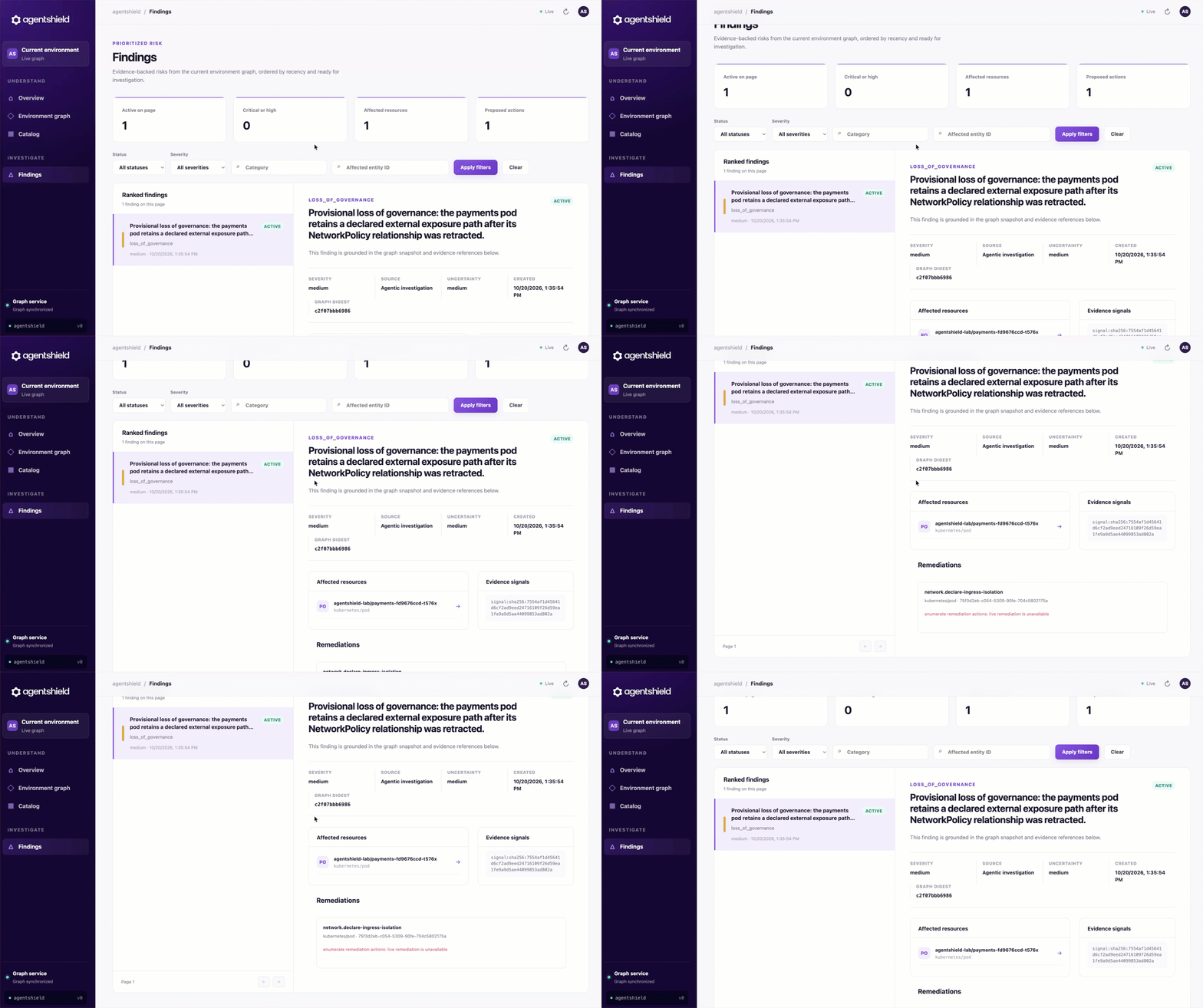
With agentic investigation, and therefore detection, enabled, you can use the following example to see what a detection and investigation look like in your Kubernetes cluster. You’ll deploy two apps, orders and payments, then delete the policy that protects payments. That should make agentshield say “hmm, that doesn’t look right,” and you’ll see the finding in the UI.
Deploy workloads governed by a NetworkPolicy.
paymentsaccepts ingress only fromorders, and the containers runpause, so nothing listens.kubectl create namespace agentshield-lab kubectl label namespace agentshield-lab \ pod-security.kubernetes.io/enforce=restricted \ pod-security.kubernetes.io/enforce-version=latest cat <<'EOF' | kubectl apply -f - apiVersion: apps/v1 kind: Deployment metadata: name: orders namespace: agentshield-lab spec: replicas: 1 selector: matchLabels: app: orders template: metadata: labels: app: orders spec: securityContext: runAsNonRoot: true runAsUser: 65535 seccompProfile: type: RuntimeDefault containers: - name: orders image: registry.k8s.io/pause:3.10 securityContext: allowPrivilegeEscalation: false capabilities: drop: [ALL] --- apiVersion: apps/v1 kind: Deployment metadata: name: payments namespace: agentshield-lab spec: replicas: 1 selector: matchLabels: app: payments template: metadata: labels: app: payments spec: securityContext: runAsNonRoot: true runAsUser: 65535 seccompProfile: type: RuntimeDefault containers: - name: payments image: registry.k8s.io/pause:3.10 securityContext: allowPrivilegeEscalation: false capabilities: drop: [ALL] --- apiVersion: v1 kind: Service metadata: name: payments namespace: agentshield-lab spec: type: ClusterIP selector: app: payments ports: - name: http port: 8080 targetPort: 8080 --- apiVersion: networking.k8s.io/v1 kind: NetworkPolicy metadata: name: payments-ingress namespace: agentshield-lab spec: podSelector: matchLabels: app: payments policyTypes: [Ingress] ingress: - from: - podSelector: matchLabels: app: orders ports: - protocol: TCP port: 8080 EOFMake a risky change. The following removes the policy and exposes the Service on every node.
kubectl -n agentshield-lab delete networkpolicy payments-ingress
kubectl -n agentshield-lab patch service payments --patch '{"spec":{"type":"NodePort"}}'
Read the finding in the agentshield UI under the Findings tab.
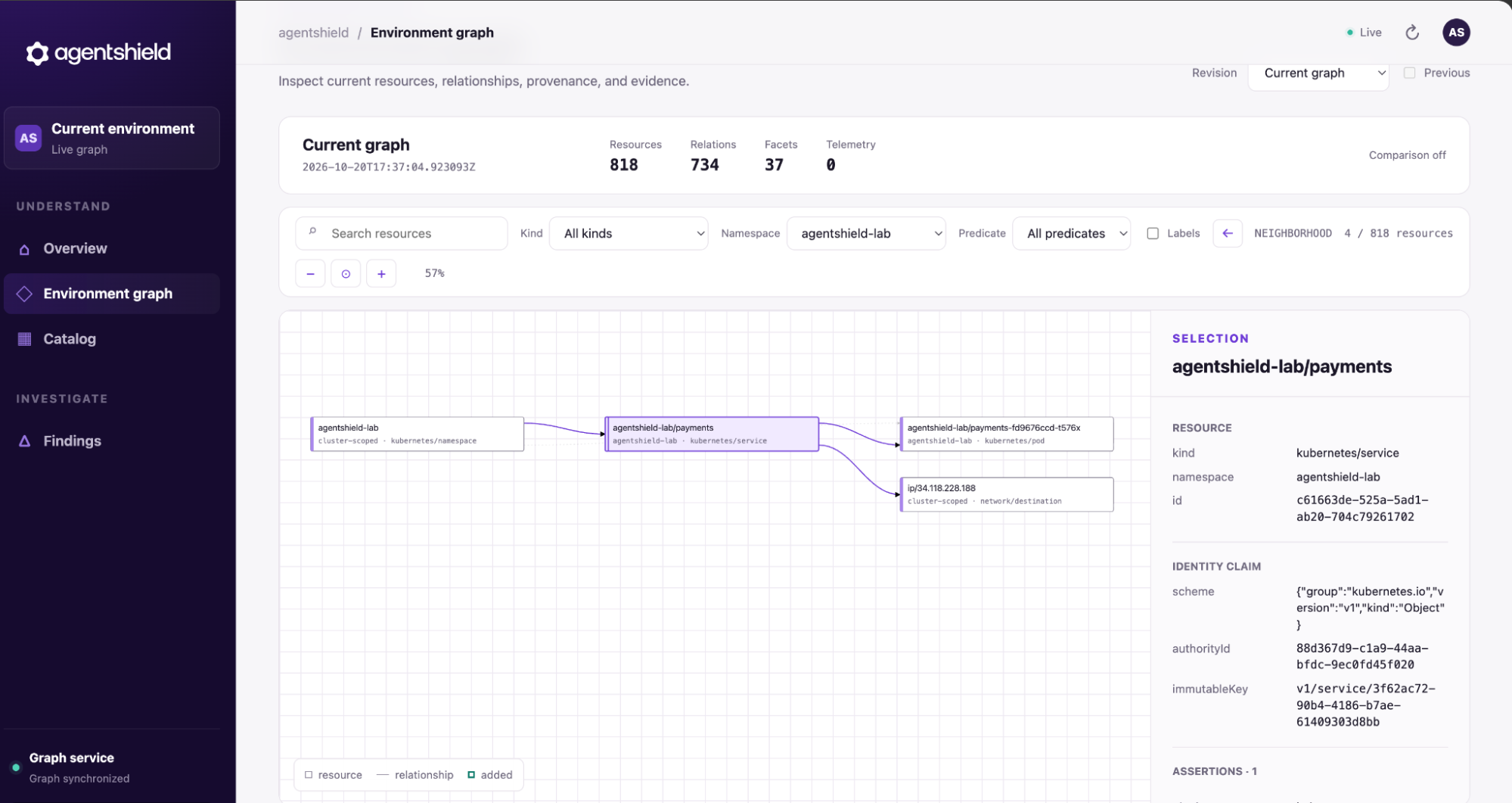
You can also view the resources it’s tied to.
Wrapping up
Without detection and rule creation for your cluster, you have no way of knowing whether an attacker will have an easy or tough time moving laterally from a compromised component. As cybersecurity dictates, it’s all about mitigating as much risk as possible, knowing that mitigating all of it is impossible.